How to watermark a PDF so the watermark can't simply be deleted
By Abdessamad BettalUpdated 4 min read
The short answer
A normal PDF watermark is an object placed on top of the page, and anyone with a PDF editor can select and delete it. To make it resistant, flatten each page to an image with the watermark burned in. You lose selectable text and links and the file gets bigger, so flatten only when removal really matters.
On this page
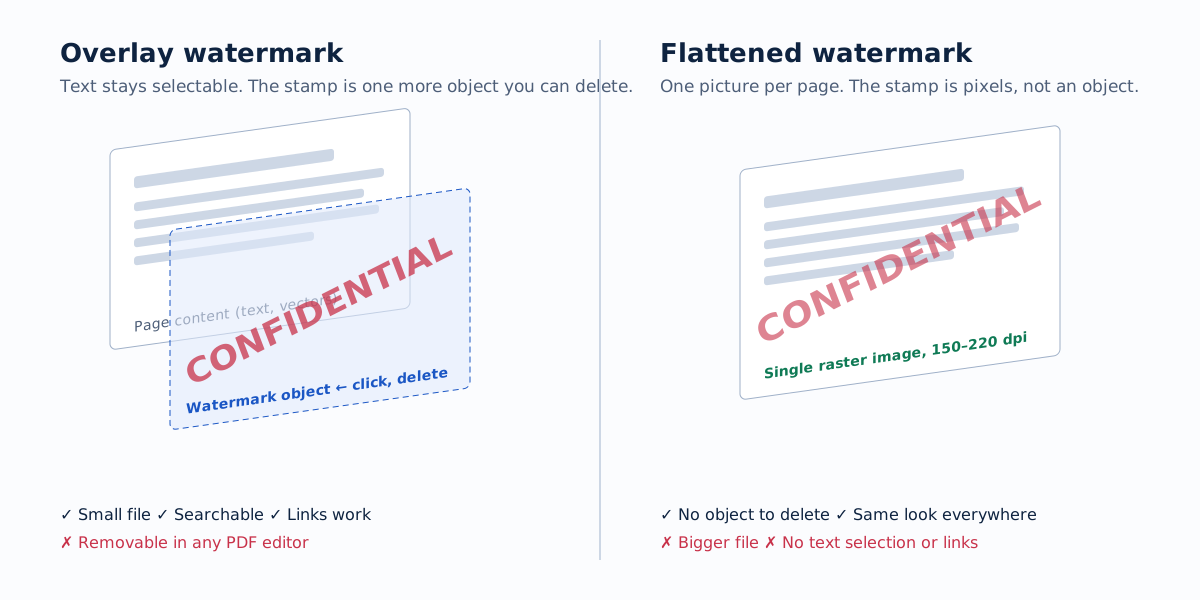
A PDF page isn't a picture. It's a list of drawing instructions: put this text here in this font, draw this line, place this image there. When most tools "add a watermark", they append one more instruction to that list. The page looks stamped, but the stamp is still a separate object, and that decides how easy it is to remove.
Why most PDF watermarks come off
Open a watermarked PDF in a full PDF editor, click the stamp, press delete. That's often all it takes. Some editors also have a built-in "remove watermark" command that finds marks added by their own watermark feature and removes them across the document. Even without an editor, the watermark object can be removed by scripts that rewrite the PDF's content streams.
That's fine when the mark is a courtesy label: DRAFT on a contract under review, FOR INTERNAL USE on a slide deck. Everyone involved wants the label there. It isn't enough when the mark is meant to deter a recipient from passing the document on.
Flattening: making the mark part of the page
Flattening renders each page to an image, draws the watermark into that image, and builds a new PDF from the results. There's no watermark object any more, and no text layer underneath to recover. Removing the mark now means editing pixels on every page, which is slow, visible and rarely worth the effort.
Flattening has real costs, so know them before you choose it:
| Overlay watermark | Flattened watermark | |
|---|---|---|
| Removable by deleting an object | Yes | No |
| Text selectable and searchable | Yes | No |
| Screen-reader accessible | Yes (if the source was) | No |
| Links, bookmarks and form fields | Kept | Removed |
| File size | Grows a little | Grows, often several times |
| Print quality | Unchanged | Depends on the dpi you choose |
| Best for | Drafts, internal labels, branding | Documents sent to people you don't fully trust |
✓ yes · ~ partly or it depends · ✕ no
Choosing a resolution
The PDF watermark tool offers three:
- 110 dpi: smallest file, readable on screen, visibly soft when printed.
- 150 dpi: a good balance for documents that will be read on screen. This is the default.
- 220 dpi: use when the recipient will print. Small type stays crisp.
The page size in points is preserved, so a flattened A4 page is still A4.
What the tool does with each page
In overlay mode, the watermark is drawn once per page size as a transparent PNG, trimmed to the painted area, and placed on each selected page. Pages with a rotation flag (common in scanned documents) get the stamp mapped into their own coordinate system, so it appears upright to the reader. Text, vectors, links and bookmarks are untouched.
In flatten mode, every page is rendered with Mozilla's PDF.js, the watermark is drawn onto the selected pages, and each page is re-encoded as a JPEG inside a new PDF. Pages outside your page range are still flattened, so the whole document behaves consistently.
Some PDFs are encrypted against editing. They can be opened but not rewritten. When that happens the tool falls back to flattening automatically and tells you which files it flattened.
Make each copy identifiable
The strongest deterrent isn't how hard the watermark is to remove. It's whose name is on it. A stamp reading CONFIDENTIAL · prepared for Alex Morgan, 18 Nov 2026, tiled faintly across every page, changes the recipient's calculation: a leaked copy points straight back to them, and they know it.
To do this for several recipients:
- Set up the stamp once with a second line for the recipient's name.
- Export a copy, edit the name, export again. The tool remembers everything else.
- Keep a short log of who received which version.
For high-stakes documents, combine both: an identifying tiled stamp and flattening.
Don't upload the document to do it
A document sensitive enough to watermark is usually sensitive enough that it shouldn't be sent to a third-party server. Plenty of free PDF sites upload your file, process it remotely and keep it for a while, often under terms that are vague about how long.
Here the PDF is opened and written by your own browser. You can check this yourself: open your browser's developer tools, switch to the Network tab, run a watermark, and confirm that no request carries your file.
What a watermark can't do
A visible watermark won't stop someone retyping the content, photographing the screen, or summarising the document. PDF "permissions" that block copying or printing are honoured only by software that chooses to respect them. Treat a watermark as a deterrent and an audit trail, not access control. For access control, limit who receives the file in the first place.
Frequently asked questions
Can a PDF watermark be removed?
An ordinary overlay watermark can: it is a separate object, and PDF editors can select and delete it, and some have a remove-watermark command. A flattened watermark is part of a page image, so removing it means editing pixels on every page, which is slow and leaves visible traces.
Does flattening a PDF make it bigger?
Usually, yes. Every page becomes an image. At 150 dpi a text page is typically a few hundred kilobytes; at 220 dpi it can be two to three times that. Scanned documents are already images, so they grow much less.
Will the text still be searchable after flattening?
No. Flattened pages are pictures, so text can't be selected, searched or read aloud by a screen reader, and links and form fields are removed. Keep the original for anyone who needs an accessible copy.
Is a password more secure than a watermark?
They do different things. A password controls who can open a file; a watermark marks what happens after someone has opened it. PDF 'permissions' such as no-copy or no-print are enforced only by cooperative software and are easy to bypass, so don't rely on them for confidentiality.
Add a watermark to a PDF
Stamp CONFIDENTIAL, DRAFT, your name or a logo across PDF pages. Choose pages, batch several files, and optionally flatten so the watermark can't be removed.
Watermark a PDF