Add a watermark to a video
Open a clip, drag your handle or logo into the frame, and export. Your device does the encoding, so there's no upload to wait for and no file size limit set by a server.
Drop a video here
MP4, MOV, WebM or MKV. The video is decoded and re-encoded by your own device, so even long clips never leave it.
How to add a watermark to a video
- 1
Open a video
Drop an MP4, MOV, WebM or MKV file. It starts playing in the preview straight away because nothing has to upload.
- 2
Place the watermark
Add text or a logo and position it while the video plays, so you can see it against bright and dark scenes.
- 3
Export
Choose MP4 or WebM, a quality and a resolution. The audio track is carried over.
Encoded by your own hardware
The tool uses the WebCodecs API built into current browsers, which hands decoding and encoding to your device's video hardware where it can. A typical phone clip exports faster than it would take to upload it to a server-based tool, and the file never touches anyone else's computer.
Videos larger than about 300 MB are written straight to disk in Chrome and Edge rather than held in memory, so long recordings don't run the tab out of RAM.
The watermark is part of the picture
The mark is drawn onto every frame before encoding, so it can't be switched off like a subtitle or stripped out as a separate track. Rotation stored in phone footage is applied first, which keeps the watermark upright in every player.
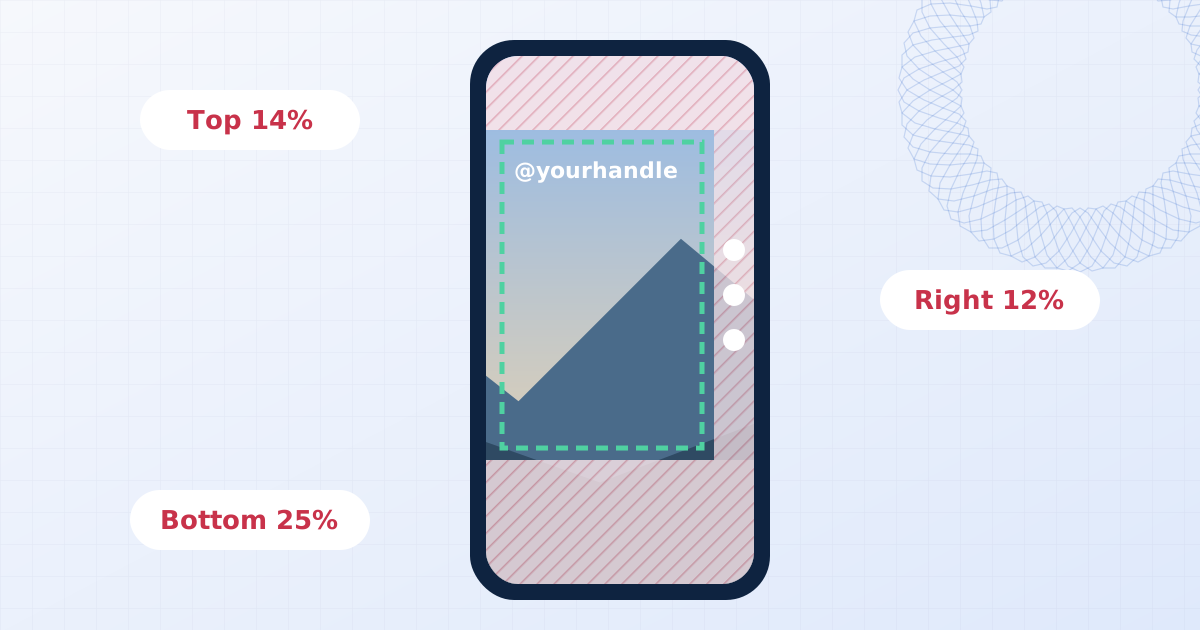
Use a corner position with moderate opacity for a channel handle, or tile a faint mark across the frame for review copies you don't want reused.
Questions people ask
Is my video uploaded?
No. The file is opened, edited and saved by your own browser. Nothing is sent to a server, which you can confirm in your browser's network tab while you work.
Is there a length or size limit?
No limit is imposed. Export time depends on your device: expect roughly real-time or faster for 1080p on a recent laptop. Keep the tab in the foreground, because browsers slow down background tabs.
Will the audio be kept?
Yes. The audio track is copied when the output format allows it and re-encoded otherwise. If your browser can't encode the audio, the tool tells you after the export.
Which browsers work?
Current versions of Chrome, Edge, Firefox and Safari support the WebCodecs API the tool relies on. If your browser can't decode a particular file, converting it to H.264 MP4 first usually helps.
Does re-encoding reduce quality?
Any re-encode loses a little. The High and Very high settings use a bitrate where the difference is hard to see; lower settings trade quality for a smaller file.
Learn more

Related tools
- Add your logo to a videoOverlay your logo or channel handle on a video and export MP4 or WebM with audio. Position it on a live preview. Processed on your device, nothing uploaded.
- Remove a logo from a videoHide a static logo, channel bug or timestamp in a video. Box it in, preview the result on the playing clip, and export MP4 or WebM. No upload, audio kept.
- Add a watermark to photosAdd a text or logo watermark to one photo or hundreds at once. Drag to position, set opacity and rotation, then export JPG, PNG or WebP. Nothing is uploaded.
- Add a watermark to a PDFStamp CONFIDENTIAL, DRAFT, your name or a logo across PDF pages. Choose pages, batch several files, and optionally flatten so the watermark can't be removed.